- Simplified online process for EPF wedding withdrawals via e-Sewa portal.
- Withdraw funds up to five times for marriage expenses during membership.
- New rules allow five withdrawals for marriage purposes.
EPFO Withdrawal: If you are planning a wedding and need to withdraw from your Employees’ Provident Fund, the process is now much easier. The EPFO has announced several updates to the EPF advance withdrawal rules, including changes to the frequency of withdrawals permitted for various purposes.
The Employees’ Provident Fund (EPF) is a government-backed savings scheme in India designed to help salaried workers build a retirement nest egg. This scheme has also provided vital financial assistance to couples managing wedding expenses. Account holders can now access these funds earlier in their careers without needing to approach their employer or wait for their approval.
Here is everything you need to know about EPF marriage withdrawals.
How To Withdraw EPFO Amount
1. Log in to the EPFO Portal at Unified Member e-Sewa Portal.
Visit the official EPFO Member e-Sewa Portal. Sign in using your UAN, password, and captcha.
2. Verify KYC & Service Details
Go to Manage -> KYC to confirm your Aadhaar, PAN, and bank details show as verified. Go to View -> Service Details to verify your total years of service.
3. Navigate to Claim Section
Click on the Online Services tab in the top menu and select Claim (Form-31, 19, 10C & 10D) from the dropdown.
4. Verify Bank Account Details
Your member details will appear on the screen. Enter the last 4 digits of your linked bank account number and click Verify. Click Yes to sign the Certificate of Undertaking.
5. Select Advance Purpose (Form 31) Applying for Marriage Advance.
Click on Proceed for Online Claim. Under the "I want to apply for" dropdown, select PF Advance (Form 31). In the "Purpose for which advance is required" dropdown, select Marriage.
ALSO READ: Need Urgent Cash? EPFO Allows EPF Balance Withdrawal Under These 5 Special Cases
6. Enter Amount & Address
- Enter the amount required for the withdrawal.
- Fill in your complete residential address.
- Upload a scanned copy of your cancelled cheque or bank passbook (in JPEG/JPG format, clearly showing account number and IFSC).
7. Submit claim via Aadhaar OTP
Check the self-declaration box and click Get Aadhaar OTP. Enter the OTP received on your Aadhaar-registered mobile number and click Validate OTP and Submit Claim Form.
EPFO Withdrawal: Check Processing Time
- Status Tracking
Go to Online Services -> Track Claim Status to check the status of your application.
- Online claims are typically credited directly into your linked bank account within 7 to 15 working days.
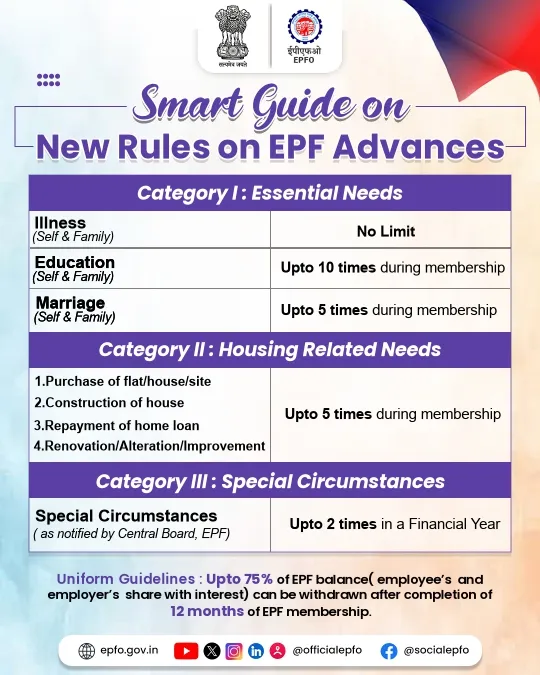
EPFO Withdrawal Limit: Check THESE New Rules
- In the case of health issues of self and family, there is no limit on the number of times you can withdraw your money.
- In case of educational needs of self and family, the amount can be withdrawn ten times during the membership period.
- In the case of marriage of self and family, the amount can be withdrawn five times during the membership period.