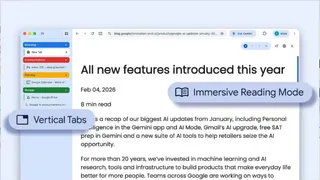
Google Chrome new featuresGoogle has dropped two new features in its browser, Chrome, with the goal of enhancing user experience. This new feature introduces vertical tabs to its browser, and users can now stack their tabs along the side of the window, and they will appear organised vertically, turning its focus away from the traditional horizontal bars. With this update Chrome has joined other browsers that follow the same setup, like Microsoft Edge and Mozilla Firefox. Apart from this, the reading mode of the browser has also been updated, which has been simplified to remove distractions with a full-page interface.
ALSO READ: Google Brings AI Shopping To Gemini, Search And Circle To Search With Massive Upgrades
Vertical Tabs and Reading Mode Updates
In a recent blog post, Google introduced a couple of new additions to the Google Chrome experience, along with short demo clips showing how they work in real use.
One of the bigger changes is the option to switch to vertical tabs. Instead of stacking tabs along the top, you can now move them to the side of the screen. All it takes is a right-click anywhere on the browser window and selecting the option to show tabs vertically. The idea here is simple. When tabs are lined up on the side, it becomes much easier to read full page titles and manage multiple tab groups, especially when you have a lot of them open. It is a small shift, but one that could make juggling several tabs feel less messy. If the option is not available on your Chrome browser yet, then you might have to update your browser.
Alongside this, Chrome’s reading mode is also getting an upgrade. It now opens in a full-page view, making it more immersive. You can access it by right-clicking on any webpage and choosing the 'Open in reading mode' option. Once enabled, it strips away distractions and leaves you with a clean, text-focused layout, which is useful when you just want to focus on the content without everything else getting in the way.
Google has been on a spree of rolling out new features, and last month the Mountain View-based tech giant introduced a Gemini side panel in Chrome that you can spot in the top right corner of the window where horizontal tabs are stored. Although the US version comes with an Auto Browse feature as well, which essentially gives control to Gemini to do tasks on the user's behalf. Another tool that was just recently announced was AI shopping in Search and Circle to Search to enhance the daily shopping experience with everything clubbed into one place so the user does not have to switch between windows. In February the tech giant introduced features like Split View, built-in PDF markup tools and more.