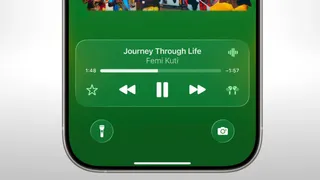
Apple has released iOS 26.2 for iPhone, the second major update to its newest mobile operating system. Shipped out last Friday after weeks of testing through developer and public beta programmes, the update includes a mix of visual refinements, usability enhancements and new safety-focused features. iOS 26.2 This update introduces new features, including the ability to play music from Apple’s Liquid Glass interface and offline lyrics support for Apple Music; it also includes improvements throughout applications such as Reminders, Podcasts, Games and AirDrop. These features can mostly be used worldwide, although a few are currently limited to certain regions. Here is a complete look at what’s new in iOS 26.2 and how iPhone users can update to it.
iOS 26.2 Update for iPhone: How to Install
Here’s how Apple describes compatibility with all iPhone models that were qualified to use the iOS 26.2 beta.
ALSO READ: Google Introduces Real-Time Headphone Translations And New Gemini Features In Google Translate
To install the update:
1. Open the Settings app on your iPhone.
2. Navigate to General > Software Update.
3. Let your device check for available updates.
4. Tap Download & Install, then accept the terms.
5. Wait for the installation to complete. Your iPhone may restart multiple times during the process.
iOS 26.2 Update: What’s New
Apple Music Enhancements
There are also two big improvements in the Apple Music app. The Favourite Songs playlist is now showing under the Top Picks section of the Home tab for users. What's more, Apple is also rolling out support for offline lyrics so that users can now download and view song lyrics even without an internet connection.
More Lock Screen Customisation
Apple has also added some new options for customising the lock screen clock, so you will be able to adjust the opacity of the Liquid Glass-based UI. This makes it look more personalised and still be readable.
Enhanced Safety Alerts
26.2 for iOS Introduces Enhanced Safety Alerts- Advanced threat alerts alert users to imminent dangers, like flooding or natural disasters. The alerts may also carry maps of the affected areas and links to safety guidance. This feature is currently exclusive to the US.
Reminders Get Alarms
A new feature of the Reminders app is that now you can set alarms One tap on it and see an experience to manage time-sensitive tasks. The feature includes snooze functions and Live Activity support for updates as they happen.
Improved AirDrop Security
Now, AirDrop adds an additional layer of verification when sending files to people you don’t know. Users have to type in a code into the sender’s device, providing yet another layer of security.
Podcasts App Improvements
Apple updated its podcast episodes to include automatically generated chapters, making it easier for listeners to skip around. They have also added links to podcasts listed during playback so that you can see and follow these when using the player or reading a transcript.
Games App Updates
The Games app has added filters so that you can sort games by category, size and more. Apple has also added in-game challenge score banners for real-time information and enhanced compatibility with external game controllers, including those from Backbone and Razer.
Additional Features and Accessibility Updates
Other changes in iOS 26.2 include:
- Screen flashing for alerts in Accessibility settings
- A new Apple News shortcut at the top of the Today Feed
- Support for using the same setup code during multipack accessory pairing in the Home app
Final Thoughts
Practical updates versus sweeping changes are the theme of iOS 26.2, which offers refined everyday features in music, safety, productivity and gaming. Offline lyrics, improved lock screen customisation and more robust AirDrop security are among the more substantive changes; accessibility tweaks and system-wide improvements round out the package. Although a few details are still regional, iOS 26.2 is Apple’s latest step at helping you let loose on your iPhone with usability and performance improvements galore!