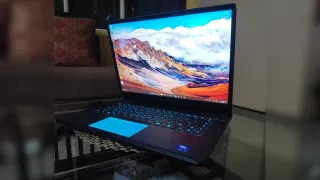
When it comes to gaming, Alienware is the name that comes to mind first in the laptop segment, and that is exactly the machine that I tested this time to see if the hype is real or not. Alienware has been the epitome of gaming for a long time, and I expected nothing less from the system this time as well.
So let's dive in and take an in-depth look at what the system comes loaded with and how it actually performs in real time when it comes to gaming as well as daily tasks. So let's take a look at its specs first before getting into how the machine actually performs.
Alienware 16 Area-51 Body and Design
Well, from above it looks like a fairly simple system with the Alienware logo on the top lid, but the game changes once you open it. When you open the system and turn it on, a cool blue light lights up the mouse pad and effortlessly makes it look like the mouse pad itself is made up of glowing glass, although it can also be turned off. The same type of lighting can be found on the back module where the connectivity apparatus is located, and the keyboard is also lit. The Alienware logo on the top lid also lights up.
When it comes to vents, it has two big ones at the back and two on both sides. Most of the connectivity options are given at the back, with a power inlet and 3 USB ports and 2 C-type ports. There is an HDMI port at the back as well. The device also sports an audio jack.
Below, there is a transparent, see-through panel that looks cool and displays what looks like a speaker.
Alienware 16 Area-51 Specs and Features
For starters, the processor under the hood is the Intel Core Ultra 9 275HX, with 2.7 GHz to 5.5 GHz clock speeds, the benchmarking scores for which I will specify below. This processor has 24 cores and 24 logical processors. The device that I got came installed with 32 GB of DDR5 SODIMM RAM; however, the RAM can be upgraded to 64 GB.
Now comes the main game changer: the graphics card, which is the NVIDIA GeForce RTX 5080 GDDR7 Laptop GPU with 16 GB of memory. The device has a 16-inch 2K 2560x1600 QHD+ IPS panel, which supports a 240Hz refresh rate. However, not having an OLED is where it slightly misses the mark, but that option is available for extra cost. The device I got also has a 2TB NVMe SSD, which, in my opinion, is good enough if you plan to store games.
As far as sound is concerned, the device has a good audio setup; it was very immersive while I played games and was good enough to watch movies or even listen to music. It did not disappoint at all; in fact, it would get quite loud as well.
Processor Benchmarking
For this I used the Cinebench 2024 benchmark by Maxon.
Looking at the multi-core results, the Intel Core Ultra 9 275HX in the Alienware 16 Area-51 has a score of 1796, which is pretty good for what it provides and beats many other laptop and even desktop CPUs. The single-core performance is also quite impressive, with the Core Ultra 9 275HX scoring 126, putting it way ahead of many CPUs in the same setup.
All in all, the processor performs very well in both single-core and multicore performance and comes above most other processors in the same running, even some of Apple's M-series chips. I have attached images for better clarity below.
Graphics Benchmark
For this, I used the Unigine Heaven benchmark, and here the results were quite impressive. I used it on high settings for 2K testing. The scores here were crazy maxing out at more than 500 FPS, I have attached an image for a details.
Gaming Performance
Now let's get to the real deal: here's where the laptop really comes at the top. This beast can churn anything that you throw at it. I tried the industry's heaviest AAA games like Red Dead Redemption 2, the latest Forza Horizon 6, and some multiplayer platforms as well, and I have to say at 2k settings with most games maxed out to the highest settings, the laptop had no problem handling them at all.
Let's jump into it and see what the performance really looked like.
Before that, you must note that the device performs best when plugged in, and you will unlock its true FPS potential. Also, I turned off the stealth mode and turned on the Performance Boost for best results.
We first tried Forza Horizon 6, and at the "EXTREME" preset, I have to say the gameplay was as smooth as butter, with frame rate reaching above 100 FPS at 2K, and that is big. No stutters, no lag; the laptop handled it like a beast effortlessly. It actually felt like I was in the game for a second; it was quite immersive.
Next, I tried Red Dead Redemption 2, and this one is the real deal, and here also I have to say the Alienware 16 Area-51 was able to glide through smoothly. It was able to achieve above 60 FPS on ultra settings at all times, and that is a big deal on 2K. When the graphics were toned down a bit, it was able to achieve 70-90 FPS on the balanced preset, and on low settings the game was really smooth and was playing at 90+ FPS at all times, even reaching 100+ FPS.
This is a big deal when it comes to RDR2; this is Rockstar Games' one of the highest-grossing and one of the heaviest games that not all laptops can run with ease, and here Alienware was able to do it effortlessly. I experienced no lag or stutters at all, and the gaming experience was peak. I have attached images of the 'favour quality' preset so you can get a clear picture of it; this is the highest setting.
Apart from that, I also tested Apex Legends on it, and the frame rate was maxed out at 240 FPS for 99 per cent of the time, had no lag or stutter, and this makes it the best device to even take on your competitive streak. The frames would go beyond, but since the screen is capped at 240 Hz, it stays there all the time, and that is what most gamers would want.
Some Small Quirks Here and There
Overall, it's a very well-rounded system with less to complain about, but from an end-user perspective, there are a few things I would like to point out.
Firstly, it's not the lightest laptop; it's quite heavy and not very easy to move around with. That is because of the stuff loaded inside it, but it gets hard to manoeuvre it from one place to another or carry it around; it is sturdy, and the build quality is amazing, but it's a bit heavy.
Next is its battery life. Given the amount of power-hungry hardware put inside, like a very heavy processor and GPU, without the device being plugged in, it does not give much of a battery life and can last up to 3 to 3 and a half hours at max. Apart from that, it does make some noise when the stealth mode is turned off; I did that to get the best graphical fidelity out of it. But otherwise the system is not noisy.
Now again it is not a cheap setup and costs 4 lakhs approx. for the exact version that I had. So it's not something everyone can get their hands on, so the trade is quite heavy, and for someone who is looking for just average-level gaming and daily performance, it could be a bit of overkill.
Verdict
This is a beast and can handle everything from gaming to video editing and, obviously, your daily tasks. The price is on the premium side, but this is more like a long-term investment, and what you get is a desktop that is portable and highly capable, so I would give it a 9.5/10.