
- By Alex David
- Sun, 04 May 2025 11:23 PM (IST)
- Source:JND
With the introduction of Samsung's DeX, Google had yet to make strides with the desktop experience integration, but now it is eager to catch up with them by launching a new Desktop Mode for Android. This feature is hoped to allow for increased productivity when using an Android phone on a larger external screen, by emulating PC- like functionalities. While Google is known to be late to the game, it will be interesting to see how the newly integrated system will work with other devices. The initial preview indicates that users will benefit more from improved app integration and support, and will be offered a more flexible, responsive, windowed layout. Even though this is still in its initial phases, it is quite clear that Android is attempting to shift towards achieving a full smartphone-controlled desktop experience.
According to Android Authority, Google is constructing its version of Samsung DeX for Android. In March, they found proof that Google is working on a new developer option for Android’s desktop mode version. Even though they managed to find the “enable desktop experience features” developer option, I was unable to get the feature functioning on any of my Pixel devices. Not long ago, though, I was able to enable Android’s desktop mode on one of my Pixel devices which allowed me to demonstrate the current state of Android’s implementation of a DeX-like feature.
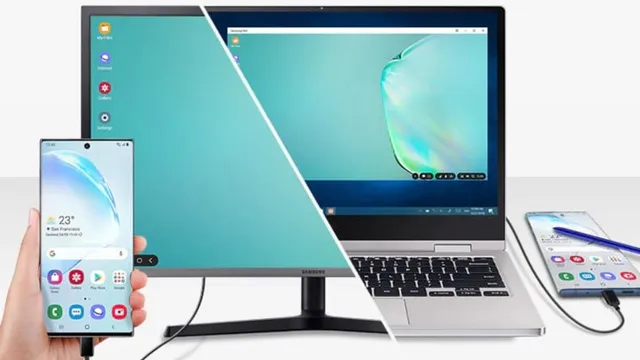
Samsung Dex
In my opinion, one of the best features integrated into Samsung Galaxy phones is Samsung DeX, a software option that replicates a desktop interface. Substantial computing power is provided by my phone and tablet. The older versions of these devices support the use of external displays. Once you connect your Samsung phone to an external display, DeX offers a desktop interface where you can launch multiple apps in floating windows and use a keyboard and mouse to fully control the device.
Despite the fact that the sole proprietors of these devices are Samsung, Google has been working tirelessly to include them in their products. We have a first look at what the Android desktop mode on Pixel phones will be.
What is Google Desktop Mode in comparison to Samsung Dex?
Remember that what you are about to witness is as incomplete as the Desktop mode would never arrive in the Android 16 stable release, slated for opening in the features. This is why we don't call it an Android 16 feature. Instead, it might come in one of the quarterly updates of Android 16, but even then, it will most likely only be available as an opt-in developer option. Until Google puts some polish on their DeX competitor, fingers crossed for Android 17’s kicking out next year.
Taskbar and status bar are displayed on Android's new desktop mode, which is a massive upgrade over the barebones taskbar present on Android Pixel devices that only show up on external displays It’s required when connected to a monitor. The taskbar lets you access to pinned applications and a much improved version of the app drawer. Sneak peek, the taskbar can also show recent apps while in desktop mode.
On the topic of multitasking, the new desktop mode allows users to launch multiple apps in floating windows at once. Furthermore, the ability to move, resize, or snap windows to desktop-like positions is also available. This facilitates easier drag-and-drop actions between applications, assuming the applications are compatible with this feature.
While most of these features can be considered basic expectations of a desktop-style user interface, they are vital for Google to get right first. From what I can ascertain, Google is trying to leverage the desktop windowing feature that’s been available on tablets for a while now on phones. For reference, Google added desktop windowing to tablets with the first quarterly release of Android 15. They allowed the launching of multiple apps in freeform windows on the tablet's integrated display, which had heretofore been locked in a single-window mode. This feature was exclusive to tablets because, as Google said, it only works on the built-in display. It seems there are plans to bring this same windowing capability to external displays in a future update.
This is a sensible starting point, but a phone connecting to an external display shouldn’t provide the same experience as a tablet. Since the phone's screen is accessible, it should be possible to operate the phone with the same accessories. As previously stated, Google is incorporating computer-style external display features into Android, consisting of rearranging displays, enabling mouse trail movements between displays, and additional functionalities.