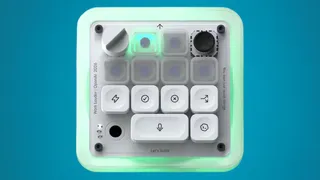
OpenAI has unveiled an entirely new hardware product; however, it’s not yet another AI gadget. Rather, OpenAI has revealed the Codex Micro, which is essentially a tiny keyboard that caters to coders working with the Codex AI coding assistant. Built in collaboration with keyboard maker Work Louder, the keypad is meant to make everyday coding tasks quicker by giving users direct access to Codex controls.
Rather than switching between windows or relying on keyboard shortcuts, developers can use dedicated keys to jump between AI agents, start a new chat or trigger specific actions instantly. The Codex Micro also comes with a joystick that lets users move through different coding workflows, while a rotary dial can be used to change how much reasoning the AI applies before responding.
Codex Micro price and availability
The Codex Micro carries a price tag of $230, which converts to roughly Rs. 22,000. It is already available to order globally through the official OpenAI and Work Louder websites.
What does the Codex Micro offer?
The keypad works with both Windows and Mac computers and supports Bluetooth as well as USB Type C connectivity. It is deeply integrated with OpenAI's Codex, allowing developers to perform common tasks without leaving their coding environment.
OpenAI says users can customise the keyboard to suit their workflow by remapping keys, creating different layouts and assigning custom commands, all without downloading extra software.
On the hardware side, the Codex Micro features a CNC machined polycarbonate and aluminium body with an anodised aluminium base. It includes 13 mechanical keys, a touch sensor, a rotary encoder and a joystick.
The joystick is designed to make moving between coding jobs more convenient. Whether it is reviewing a pull request, debugging an issue or cleaning up code, users can switch tasks with a quick flick. Dedicated command keys can also be used to accept or reject AI generated code, start a fresh conversation with Codex, use push to talk or trigger custom shortcuts.
ALSO READ: Google Teases Pixel 11 Flagship Series Smartphone, Pixel Glow Showcased: Launch Set For August 12
The rotary dial adds another layer of control by allowing developers to adjust the AI's reasoning level depending on the complexity of the task. The keyboard also supports six programmable layers and ships with 32 custom icon keycaps and 11 standard coloured keycaps, giving users plenty of room to personalise their setup.