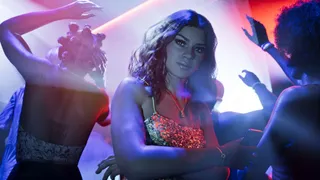
The hype around GTA 6 is quite real and massive, and now that the game is out, the GTA 6-style trend is gaining traction everywhere, from companies doing marketing campaigns with that style to people creating their own AI-generated GTA 6-style images. This new trend will turn your ordinary photos into colourful, visuals which is directly inspired by Rockstar's latest title.
The best part? You don't need to have Photoshop-level skills or tools or graphic designer-level knowledge to make these photos. There are a plethora of AI image generators out there that can do it for you; all you need is a well-done prompt, be it ChatGPT, Gemini or anything else available on the market today.
How to create a GTA 6-style image using ChatGPT
1. Open ChatGPT: Go to ChatGPT app (this can be done on the website as well) and open a new chat.
2. Upload picture: First things first, just tap the '+' icon, which can be found right next to the message box and all you do is upload a picture of your choice there, it could be anything: a selfie, group pic or something else.
3. Prompt ChatGPT : Once you are done uploading the picture. Type in a detailed prompt stating how you want it. You can specify details from GTA posters and how they look to make it clearer, add elements etc.
You can use a prompt like this:
"Create a cinematic GTA 6-inspired poster set in Vice City, featuring a stylish young man and woman standing beside a luxury sports car on a vibrant Miami-inspired street. Add palm trees, neon-lit buildings, luxury hotels, ocean views and a beautiful pink-orange sunset in the background. Give the characters realistic facial features, fashionable outfits and natural poses. Use rich colours, realistic lighting, detailed environments and the polished visual style of a modern AAA open-world video game. Make it look like a premium video game promotional poster, with a dramatic composition and no text or logos."
4. Give it a Vice City makeover: Want palm trees, sports cars, neon lights and a Miami-style sunset in the background? Mention these details in your prompt. You can also ask ChatGPT to change your outfit or the overall setting.
5. Check the result: Once ChatGPT is done with the image generation, you can see if its like what you want. If not, you can just keep refining it.
6. Save and share: If you are happy with the final result, just save the image on your device and then you are free to use it however you want.
One thing that you must note here is that ChatGPT's free version only allows a limited number of images to be generated so, you can also use other tools like Google's Gemini, and you can experiment using the steps given above.
Also, it might not hit the spot in one go, so you can keep experimenting.
What Is A GTA-Style Artwork?
This is a type of artwork that is inspired by GTA, which is a very popular game title by Rockstar Games, and it is getting more traction now because its latest and biggest edition ever has finally been launched, even in India.
The artwork in this style will take you to its poster-style images that feature bold colours, expressive lighting and over-the-top cinematic backgrounds. These images will take you inside the video game, making you look like you are a character yourself.
You can be sitting on a luxury car in Vice City, modelled after Miami and Florida, amongst the palm trees on a beach in a sunset setting. If you want that kind of action-packed urban setting, you can use the above steps to do that.
Tips That You Need to Keep in Mind
-A Clear photograph with good lighting will make things better
-You can describe the visual style in detail as you want, but try not to overload at once
-Mention in your prompt that vibrant colours and dramatic lighting are required
-You can also differentiate by prompting cartoon style or realistic
-Check for errors like fingers in hand and gestures
-If it does not work for you right away, you can try again
ALSO READ: Buy GTA 6 Now On Blinkit: Quick Commerce App Lists Physical Copy, Check City-Wise Availability
You can explore how your digital creativity flows with this new style. Multiple tools can be used and you need not stick to just one, and each and every tool offers its own advantages, like if you do it in Canva, you will be able to add text as well of your choice. You can also use Adobe Firefly for additional options and editing, and Leonardo AI is another tool you can use; these can also be used in social media posts or anything else.
This is a way to achieve cinematic and gaming-level pictures without any expertise. Although some AI image generators might be paid and some are limited as I mentioned above, check the platform before you start.