
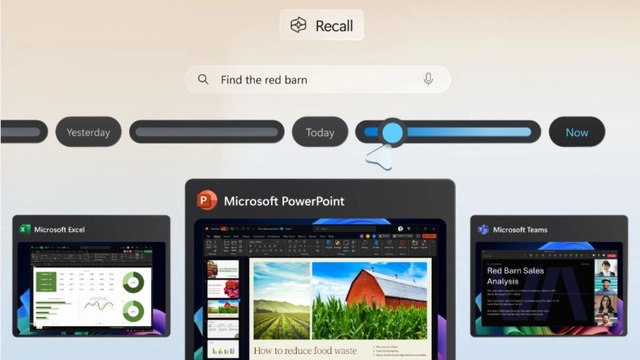
Soon after showcasing the preview of the Recall feature for Copilot+ PCs, the company is making a significant change to address the newly highlighted security risks of the feature. The company is making the experience as an opt-in offering on these eligible machines. For the unaware, Recall can allow users to instantly skim across the previous updates of an app, image, website and document via a screenshot-based timeline.
According to Microsoft, these images are encrypted, stored and analysed locally using AI. The "photographic memory" can be altered to pause saving, filtering apps and deleting saved screenshots. The Recall (preview) feature will start shipping on Copilot+ PCs on June 18. Microsoft will update the set-up experience of these PCs to allow users to either start saving or not save snapshots.
"If you don't proactively choose to turn it on, it will be off by default," the Windows Experience Blog noted. Users must enrol with Windows Hello to enable the feature. A "proof of presence" will be required to view the timeline and search. For enhanced data protection, the company will implement "just in time" decryption protection via Windows Hello Enhanced Sign-in Security (ESS). This implies these screenshots will only be visible when the user authenticates access.
Recommended For You
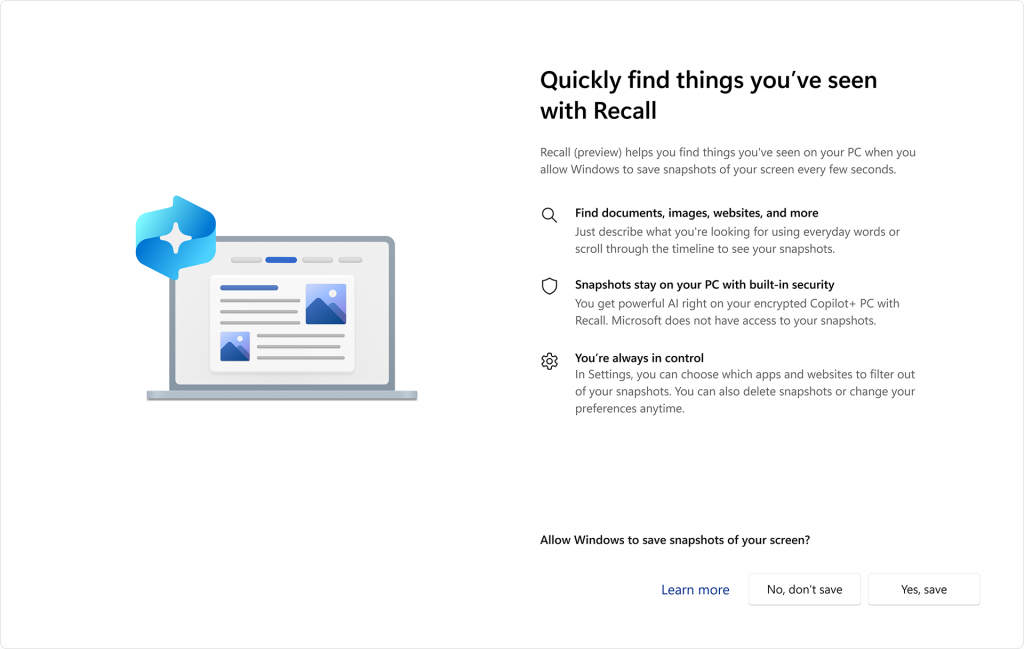 Set-up experience of Windows Recall feature. (Image:Microsoft)
Moreover, the company is also encrypting the search index database. The recent change comes after cybersecurity expert Kevin Beaumont discovered the feature stores the data in a database in plain text, according to The Verge. It could have enabled bad actors to extract the contents of these databases. These snapshots are stored locally and involve no cloud or internet-based processing. Plus, these are not used to train AI.
"Recall doesn't share snapshots with other users who are signed into the same device, and per-user encryption ensures even administrators cannot view other users' snapshots," Microsoft said. A Recall icon will appear in the system tray when the features are saving screenshots. Plus, snapshots for digital rights managed content or InPrivate browsing on supported browsers will not be saved.